Watermark removal
7 Best Free Watermark Removers Online: What Actually Works?
Seven free tools for removing visible watermarks from images you own, what each does well, and when licensing the image is the right answer.
By The Erazely TeamPublished 4 min read

Watermark removers are useful when the watermark is yours: your own photos from an old portfolio, a product image you shot with a studio mark, or a draft where the original file is lost.
They aren’t a way around paying for images. Only remove a watermark from an image you own or are authorised to edit. If it’s a stock photo, license it; you’ll get a clean, full-resolution file anyway. With that said, here is what works, starting with the free Erazely Watermark Remover.
The short answer
- Erazely looks for the watermark for you and is free with no account.
- Semi-transparent marks over simple backgrounds come out best in every tool.
- For a stock photo, license it rather than removing the mark.
Before you start: is it yours to edit?
Only remove watermarks you have the right to remove
A watermark usually means someone owns the image. Removing it from a photo you don’t own can break copyright law and the site’s terms. Use these tools on your own images, or with the owner’s permission. For stock images, buy a license. See our responsible use policy.
Quick comparison
| Tool | How you mark it | Free version | Watch out for |
|---|---|---|---|
| Erazely | Auto-detect or box | Free, no account | One image at a time |
| Cleanup.pictures | Brush | Free | 720px exports |
| Clipdrop | Brush | Daily free cap | High resolution is Pro |
| Fotor | AI or brush | One-time free credits | Credits run out |
| Photoroom | Retouch tool | Export limits | Aimed at product photos |
| Adobe Express | Brush | Limited generations | Generative credits |
| Photopea | Manual tools | Free with ads | Takes practice |
The 7 best free watermark removers
01Erazely Watermark Remover
Open the toolFinds visible watermarks, logos and text for you.
Erazely scans the image for likely watermarks and suggests them. Confirm, or mark the area yourself. For semi-transparent marks it tries to recover the photo underneath before rebuilding anything. Small repairs run in your browser; larger selections are rebuilt on Erazely’s server and deleted automatically.
Relevant features
- Automatic watermark, logo and text detection
- Recovers the photo under see-through marks
- Brush and box tools for anything missed
- A separate PDF watermark remover
Limitations
- Visible marks only; it doesn’t remove invisible watermarks like SynthID
- Large tiled watermarks may need several passes
- What’s free
- Free with no account and no watermark of its own.
- Best for
- Removing your own watermarks from photos and PDFs.
02Cleanup.pictures
cleanup.pictures (opens in a new tab)A simple eraser that also handles watermarks.
Its homepage lists watermarks among the things it removes, and warns that you should only do so with explicit permission.
Relevant features
- Brush-and-erase
- Logos, text and date stamps
Limitations
- Small free exports
- No automatic detection
- What’s free
- Free, with exports limited to 720px.
- Best for
- Small images for the web.
03Clipdrop
clipdrop.co (opens in a new tab)Cleanup plus a text remover for text-style watermarks.
Use Cleanup for logo marks and the separate Text Remover for text watermarks.
Relevant features
- Cleanup and Text Remover
- Upscaler
Limitations
- Daily caps
- High resolution needs Pro
- What’s free
- Free with daily caps.
- Best for
- Text-based watermarks on a few images a day.
04Fotor
fotor.com (opens in a new tab)A dedicated AI watermark remover, plus a batch version.
Fotor gives every user free credits once when they register; after that you subscribe or earn credits. Its FAQ says it doesn’t support removing watermarks from copyrighted stock photos for commercial use.
Relevant features
- AI watermark remover
- Batch watermark removal
- Full photo editor
Limitations
- Credits run out
- Account needed
- What’s free
- A one-time batch of free credits on sign-up.
- Best for
- Removing your own watermark from a batch of images.
05Photoroom
photoroom.com (opens in a new tab)Retouch for marks on product photos.
Photoroom’s Retouch tool removes marks and distractions; the app is built around product shots with clean backgrounds.
Relevant features
- Retouch
- Background removal
- Product templates
Limitations
- Export limits
- Built for products
- What’s free
- Free plan with weekly and monthly export limits.
- Best for
- Sellers reusing their own product photos.
06Adobe Express
adobe.com (opens in a new tab)Generative removal inside a design editor.
Brush over the mark with Remove object and generative AI fills it.
Relevant features
- Generative Remove object
- Design tools
Limitations
- Limited generations
- Not watermark-specific
- What’s free
- Free plan with limited daily generations.
- Best for
- Reworking your own branded graphics.
07Photopea
photopea.com (opens in a new tab)Manual control for watermarks over detail.
The Clone Stamp and Patch Tool let you rebuild an area by hand where AI tools struggle, such as a mark across a face or text.
Relevant features
- Clone Stamp, Patch Tool, Spot Healing
- Layers
Limitations
- Slow for big or tiled marks
- Learning curve
- What’s free
- Free with ads.
- Best for
- Tricky marks over fine detail.
Example: removing a corner badge with Erazely
Corner badges and logos are the most common watermark style. Here’s a real run on a product photo we made, with our own made-up brand badge:


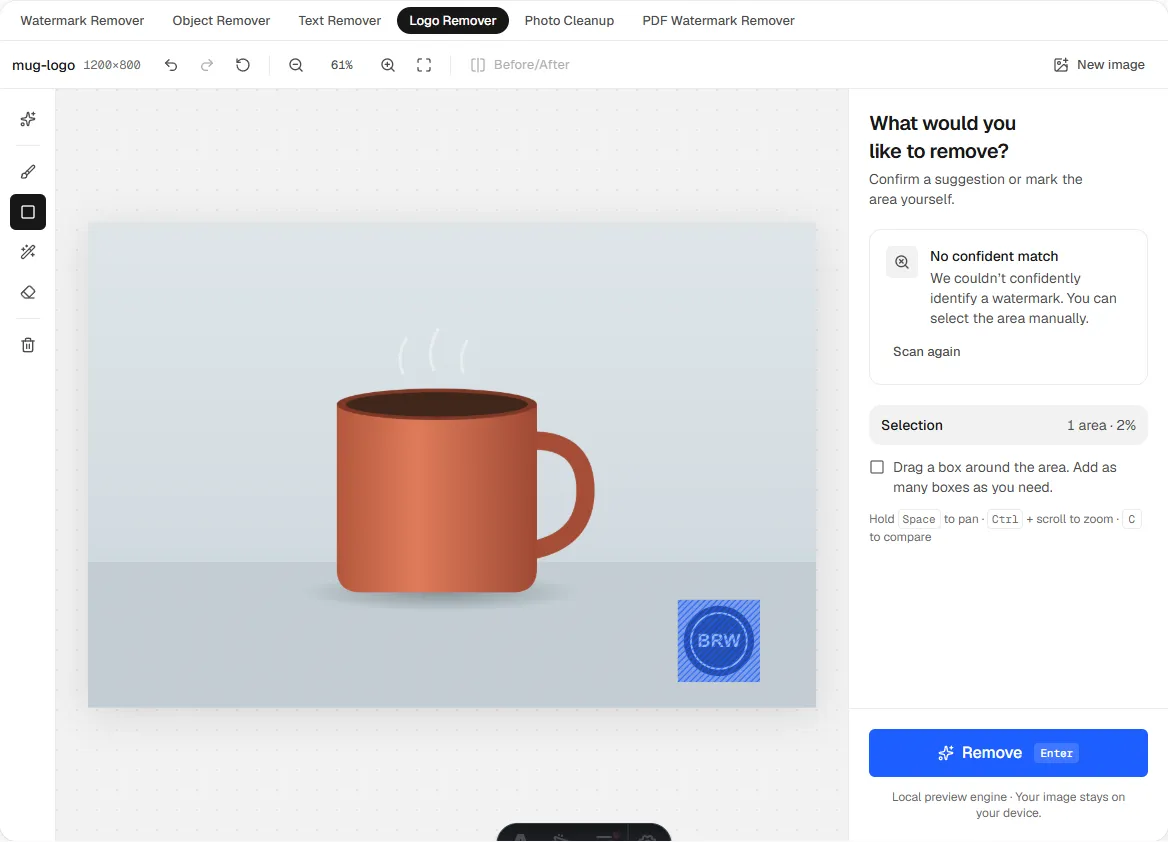
One rectangle over the badge was all the selection this needed.
Remove a watermark from your own image
Free, no account. Erazely looks for the mark for you.
What actually works (and what doesn’t)
- Works well: small corner logos, semi-transparent text, and marks over sky, walls or plain backdrops.
- Harder: large tiled watermarks, opaque marks over faces or text, and heavily compressed images.
- Not possible: no tool recovers the exact original pixels. The result is a reconstruction.
- Not removed: invisible watermarks and provenance data. See our guide to AI image watermarks.
For text-style marks, our text remover comparison goes deeper.
How we wrote this. Erazely is our product, which is why it’s listed first. We describe every tool by what its own website says it does, and checked prices, free-tier limits and account rules on. Plans change often, so confirm on the official site before you pay. Erazely isn’t affiliated with or endorsed by the other companies named here. See sources.